
Getting Started
What is Ruby Relay?
Ruby Relay is a live chat widget that routes website visitor messages straight into Slack. No new dashboards, no per-seat pricing, no context switching. Your visitors type, your team replies from the tool they already live in.
Why Slack?
Slack is where modern teams already spend their day. It supports custom app integrations (like Ruby Relay), delivers elegant real-time messaging, has a world-class mobile app so you can reply from anywhere, and offers a generous free tier that works for most small teams out of the box. If your team lives in Slack, your customer conversations should too.
What you need
The bar is intentionally low:
- A website where you can add a small script tag (or a React/Next.js app)
- A Slack workspace
- About three minutes of uninterrupted time
That's it. No build tools, no server configuration, no PhD in YAML.
Quick-start guide
1. Create your account
Head to the Ruby Relay portal and sign up with your email. After a quick email verification, you'll land on the setup wizard and be ready to go.
2. Connect your messaging platform
The wizard walks you through a standard OAuth flow. Click Connect to Slack, authorize Ruby Relay, and pick the channel where conversations should land. The whole thing takes about 30 seconds. For the full details, see Connecting Slack.
3. Install the widget
Copy the embed snippet from your dashboard and paste it into your site's <head> or before the closing </body> tag. If you're on React, we have a component for that too. Full instructions in Installing the Widget.
4. Send a test message
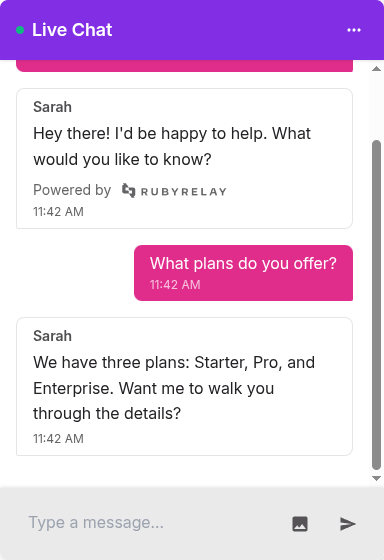
Open your site, click the chat bubble, and say hi. You should see the message pop up in your Slack channel within a second or two. Reply from Slack and watch it appear in the widget. If it does, you're live. If not, check Troubleshooting.
Next steps
Now that you're up and running, you might want to:
- Install the widget on your site
- Customize the look and feel to match your brand
- Manage your channels across different pages or products
- Add your clients so every chat lands in Slack with their name and ID already filled in
- Review your plan and make sure it fits your traffic
Welcome aboard. If anything feels off, drop us a line at support@rubyrelay.com.